Deal with Column Types (Property)
What's a column type?
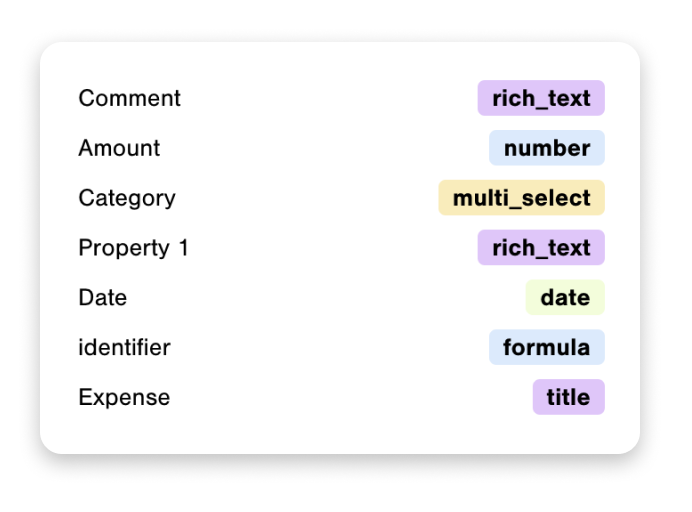
Each columns of your databases have a type. Below you can find 6 columns, with 6 different types identified by their icon.
- Expense of type
Title - Amount of type
Number - Category of type
Select - Date of type
Date - Comment of type
Text - Property of type
Formula

Data Jumbo types
To simplify your process of chart creation, these column types are grouped into 4 categories:
Quantitative (blue)
- number
- formula (if it contains only numbers)
- rollup (if it contains only numbers)
Date (green)
- date
- created time
- last edited time
- formula (if it contains dates)
- rollup (if it contains dates)
Categorical (yellow)
- select
- multi select
- relation
- people
- checkbox
- created by
- last edited by
- status
Unique (purple)
- title
- rich text
- files
- url
- phone number
- unique ID
Note: Rollup is an exception, it gets the type of its original property.
Which types to use in Data Jumbo?
For Values (Y axis)
Only quantitative types (number and formula) can be used for displaying their value or for mathematical functions like sum or average. Remember to change the type of your columns if necessary.
Use columns of type number as much as you can.
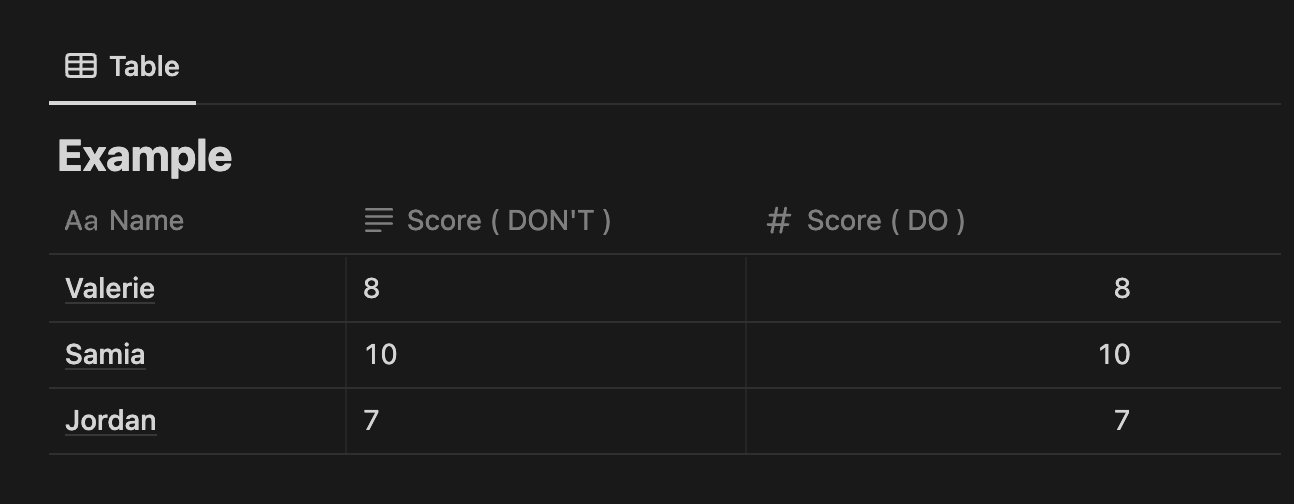
In the example below, the first score column is typed as rich text. Data Jumbo will read it as text. Instead, use a column type number (indicated by a #) so you will be able to use it as numerical value and calculate.
All of the other types can only be used as count. For example, if you want to know how many times a checkbox is checked or a specific value appears in a column.
For Labels (X axis)
- The type
dateis very useful especially when you want to group values by month, day, or even hour of the day - The
categoricalones are great as Label for grouping by value or counting values for each single category - The
uniquetyped columns will be useful to compare values of single rows - You can use a
quantitativetype for Labels, but it might not make sense